BetterMTP
Engineering
Masterpiece
Pure Rust & Swift 6
No Electron bloat, no Java runtimes, and zero Homebrew setup. BetterMTP runs on a custom, statically linked Rust engine with a Swift 6 UI. It is 100% self-contained and compiled natively for Apple Silicon (M1 through M4).
Install & Forget
Install it once and forget it exists. In the background it sleeps at practically 0% CPU and takes up less than 5MB of RAM. The second you plug your Android device into USB, it awakens instantly and gets straight to work.
UInt64 Large File Sync
Legacy tools crash on files over 4GB because of outdated 32-bit limits. BetterMTP uses strict 64-bit integer handling, so moving a 100GB 8K video file or a full phone backup never stalls or corrupts.
Unplug Recovery
Tripped over your cable halfway through a massive transfer? Don't panic. BetterMTP caches the exact byte offset where it stopped. Plug your phone back in and it automatically picks up right where you left off.
Desktop Class Nav
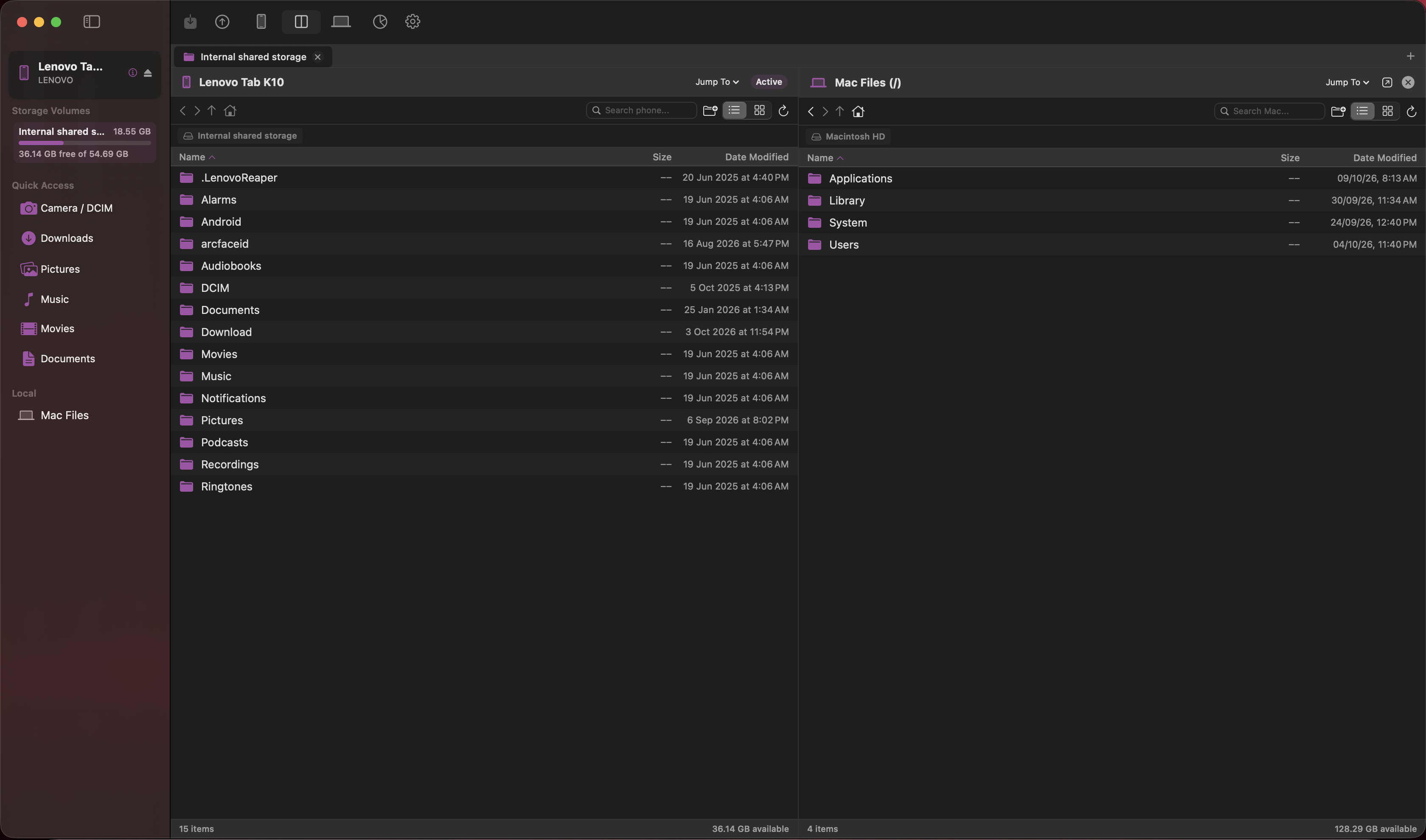
Built to feel like macOS Finder. Browse internal storage and SD cards side-by-side with dual panes, open multiple tabs, drag tabs into independent windows, and hit Spacebar for instant Quick Look photo previews.
Auto Arbitration
No more mysterious "Device Busy" popups. When Google's abandoned agents or macOS camera daemons try to hijack your phone's USB connection, BetterMTP politely releases their lock via Apple's IOKit kernel so transfers connect on the first try.
The Market Reality
| Spec | BetterMTP | AFT | OpenMTP | MacDroid | Commander One |
|---|---|---|---|---|---|
| Core | Swift 6 + Rust | Legacy C++ | Electron | Obj-C | Obj-C / Swift |
| Apple Silicon | Native | Rosetta 2 | Native | Native | Native |
| Idle Memory | Negligible | ~45 MB | None | ~60 MB | None |
| Active Memory | < 95 MB | > 120 MB | > 400 MB | > 150 MB | > 200 MB |
| Cold Launch | < 300ms | 1.5s - 3s | 2s - 4s | 1s - 2s | 1s - 3s |
| Large Files | Unlimited | Fails > 4GB | Stutters | Works | Pro Only |
| Directories | Lazy Load | Recursive | Caching | FUSE | VFS |
| Unplug | Byte Resume | Restart 0 | Restart 0 | Corrupted | Manual |
| Conflict Arb. | Yes (IOKit) | No | No | Manual | Manual |
| Quick Look | Instant | No | No | Yes | Yes |
| Junk Clean | Built-in | No | No | No | No |
Own it
Forever
No subscriptions. No cloud storage fees. One-time payment for a lifetime of native Apple Silicon performance.
Essential Daily Driver
Everything you need for clean, reliable daily file transfers. Noticeably faster and far more dependable than Google's abandoned tool, with zero bloat.
Power User & Professional Utility
Built for creators, videographers, and power users who need uncapped transfer speeds and advanced storage management tools.
Unlimited Performance & Data
- No Bandwidth Limits Unrestricted gigabytes and unlimited batch item counts.
- Max Turbo Parallel I/O Multi-threaded chunk transfers that fully saturate your USB 3.x / USB4 cable.
- Mid-Transfer Auto Resume Cable yanked? Preserves partially written bytes and auto-resumes from that exact byte offset once plugged back in.
Storage Manager Pro Toolkit
- Deep Storage Breakdown Interactive visual breakdown of internal storage and SD cards.
- Large File Finder Instant one-click filters for files over 100MB, 500MB, and 1GB.
- Exact Duplicate Detection Byte-for-byte scanner to safely uncover and delete duplicate downloads.
- Empty Directory & Cache Cleaner Safely removes abandoned empty folders and .thumbnails cache bloat without touching personal photos.
Advanced Multi Device Management
- Simultaneous Multi Phone Support Connect multiple Android devices simultaneously. Switch seamlessly or transfer directly phone to phone without using Mac disk space.
Multi Window & Workspace Power
- Tab Tear Off Drag any folder tab off the tab bar into a standalone native macOS window with smooth animations.
- Full Mac Only Mode (⌘3) Use the Mac browser pane as a standalone high density file manager alongside or outside the phone window.
Priority Support & Updates
- Direct Developer Support Get direct email help from the creators and early access to upcoming features like wireless Wi-Fi transfers.
Protected by our 14-Day Money-Back Guarantee. No subscriptions.
Pro 10x Team License
Everything in the Pro License, optimized for production studios, agencies, and dev teams. Includes activations for up to 10 Macs under a single team key.
Under The Hood
The Core Problem
Connecting an Android phone to a Mac has been broken for over ten years. Google abandoned Android File Transfer back in 2012. It still runs on an ancient 32-bit architecture that crashes the moment you try to copy a video larger than 4GB.
Modern third-party alternatives didn't solve the foundation—they just packaged it inside Electron. Running an entire Chromium browser in the background just to move files burns hundreds of megabytes of RAM and introduces noticeable UI lag. Worse, they rely on generic Homebrew libraries that frequently fight with macOS system daemons for USB control.
On macOS, background photo importers and system daemons aggressively claim USB devices the second they are plugged in. If an app doesn't know how to explicitly tell the macOS kernel to release those locks, transfers immediately fail with a generic "Device Busy" popup.
The Architectural Breakthrough
We refused to build another web wrapper. BetterMTP is a 100% native Apple Silicon binary with zero external dependencies, structured into three clean layers:
A. The Low Level Engine: Pure Rust
We skipped bloated precompiled C libraries entirely. The core MTP communication protocol was rewritten in pure Rust and compiled into a lean, statically linked archive. It communicates straight with Apple's IOKit kernel through low-overhead Mach system calls. With Rust's memory guarantees and 64-bit integer indexing, transfers of massive 100GB+ files never crash or overflow.
B. Swift 6 Actor Isolation
The MTP wire protocol is inherently synchronous—it holds the active thread while waiting for USB packets. Running that anywhere near the main thread would trigger the macOS spinning beachball. We solved this by isolating every low-level Rust call inside a dedicated Swift background actor. File progress and status streams pipe into the UI via Sendable types and AsyncStreams, keeping the interface locked at a smooth 120Hz.
C. Proactive USB Conflict Management
If Google's legacy AndroidFileTransferAgent is idling in your Mac's background, it locks the USB endpoint. BetterMTP includes an intelligent hardware arbitrator. The moment an Android device is detected, it identifies any rogue background processes holding the port, gracefully terminates them, and claims the connection cleanly.
Key Engineering Problems We Solved
1. Mid Transfer Unplug & Auto Resume
With ordinary tools, pulling the cable mid-transfer corrupts the destination file and forces you to start over. BetterMTP keeps the partial file on disk and bookmarks the exact byte offset. When you plug the phone back in, it re-establishes the MTP session, verifies the file, and continues writing from the exact byte where it paused.
2. Descriptor Settling & Auto Detection
Android devices don't advertise MTP endpoints instantly over USB—handshakes take anywhere from 300ms to 800ms to stabilize. Older apps poll once at 0ms, fail to find the device, and give up. We built an adaptive 10-step probe cycle that queries the bus every 350ms, connecting the exact millisecond the phone finishes initializing.
3. Desktop Information Density
We designed BetterMTP to feel right at home alongside Finder. That means compact 24pt row spacing, native rubberband marquee drag selection, and custom AppKit scroller modifiers that keep your column widths rock-steady even when scrollbars appear.
4. Lightweight Footprint
Cold starts take under 300 milliseconds. When running idle in your menu bar, BetterMTP consumes less than 5MB of RAM. Compare that to Chromium-based alternatives that burn 500MB+ of memory just to show an empty folder.
No Bullshit
FAQ
01Why avoid Google Android File Transfer?
+
Why avoid Google Android File Transfer?
02Is this an Electron app?
+
Is this an Electron app?
03What happens on sudden disconnects?
+
What happens on sudden disconnects?
04Will it drain my battery in the background?
+
Will it drain my battery in the background?
05How do you fix Device Busy errors?
+
How do you fix Device Busy errors?
06Can it handle massive files?
+
Can it handle massive files?
07Can I connect multiple devices?
+
Can I connect multiple devices?
08What does the Storage Manager Pro do?
+
What does the Storage Manager Pro do?
09Does it support standalone windows?
+
Does it support standalone windows?
10Is this a monthly subscription?
+
Is this a monthly subscription?
End the
frustration
You invested in a powerful Mac and a great Android phone. It's time they finally talked to each other without crashing or lagging.
Get BetterMTP NowRequires macOS 14.0+ // Universal Binary